

Introduction
Welcome to the Gravity Legal API.
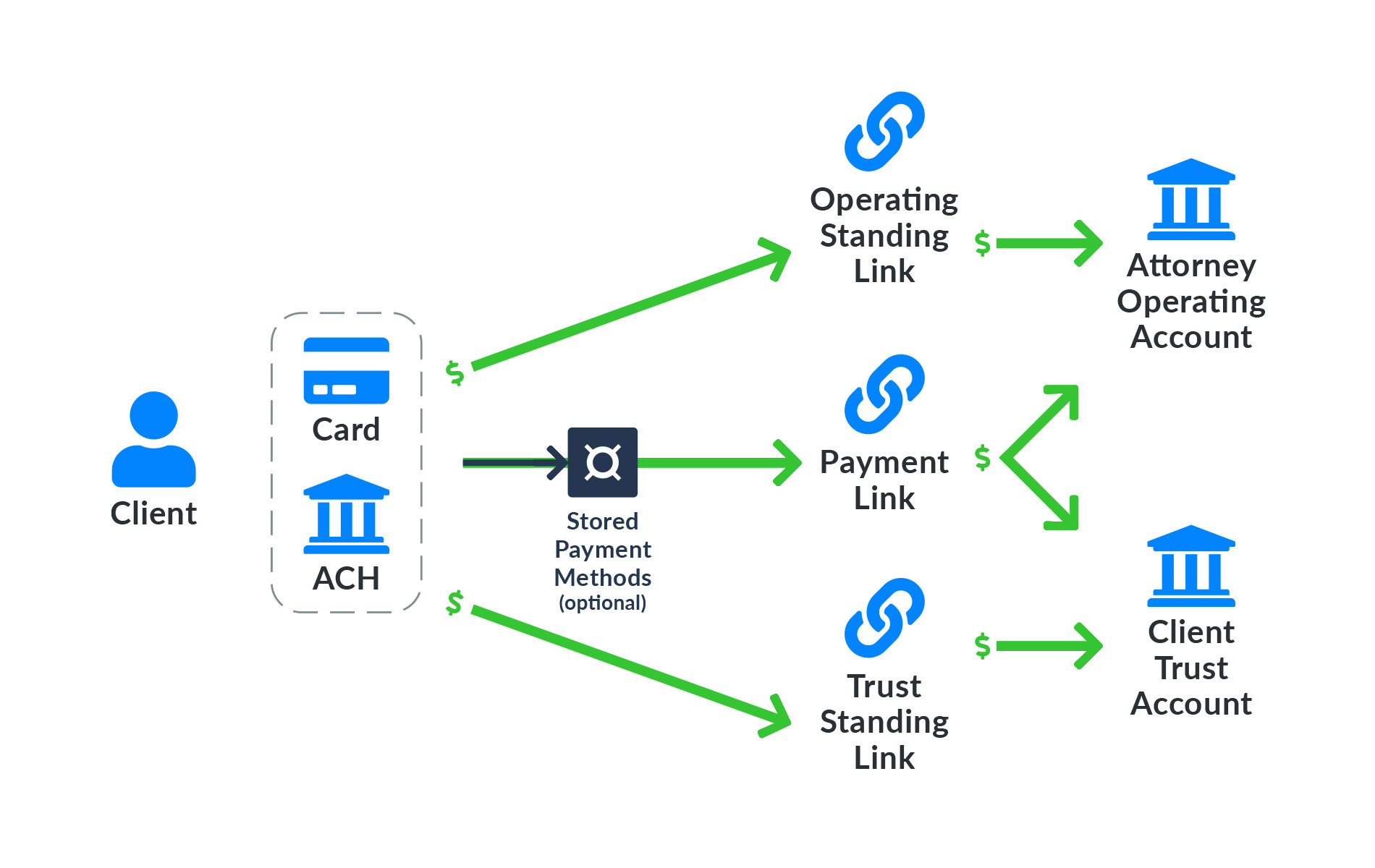
Gravity Legal allows individual attorneys or firms to collect client payments for services rendered or funds designated for a trust or IOLTA account. Firms may accept payments either via credit/debit card or direct bank transfer using a Payment Link or Standing Link. A Payment Link is created for a client whereas a Standing Link may be used by any number of clients. Clients may also securely store payment method details in a Stored Payment Method for future payments. The diagram on the right shows this.
Gravity Legal has built-in support for business processes specific to legal professionals such as strict demarcation of payments between operating and trust accounts, transfer of funds from trust to operating accounts and trust reconciliation by matter and client. Please refer to the product brief for additional information.
We realize that law firms may already be using other software systems to manage their business processes, generate client invoices and other such needs. So we have designed Gravity Legal to be easily integrated with such systems. These systems are referred as partner systems and may use the API to perform various tasks. Almost every operation that can be performed via the Gravity Legal Web UI can also be performed via the APIs. It also supports a growing number of integrations hosted within itself.
The API exposes entity and operation endpoints supported by the service. An entity represents a category of business objects sharing common properties and relations. For example, the Client entity may have many Contacts with one being a primary Contact with properties such as firstName, lastName etc. and a one-to-many relationship with the Matter entity. An entity instance is a resource in the sense of RESTful API and supports the usual CRUD (Create, Retrieve, Update and Delete) operations along with List operation for filtered and paginated retrieval of multiple instance objects. These operations are further augmented with entity specific instance and entity operations to support behavior that cannot be modelled via CRUD and List operations alone. An example of an entity operation on Client would be to get the average revenue per client over all clients for a specific attorney. In addition, there are standalone operation endpoints to effect behavior that logically don’t fit in any of the above categories, such as trustToOperatingTransfer that transfers money from one BankAccount to another.
An operation is performed by making an HTTP request to the endpoint. The parameters included in the endpoint URL and the JSON in the request message body are the inputs to the operation and the returned status code and the body of the response message is the output. Refer to the API Endpoints for more details.
You will need a partner or customer account to make the API calls. A partner account allows you to onboard your own customers and have them accept payments. Such an account is best suited for SaaS companies servicing multiple customers. In contrast, a customer account is best suited for firms that want Gravity Legal to handle client payments.
For a partner account in the sandbox environment, please send a message to admins@gravity-legal.com. Signup for customer account in the sandbox environment is automatic – just visit https://app.sandbox.gravity-legal.com and login with your Google account or Sign up with an email id.
The best way to become familiar with using the API is to try our freely downloadable sampleapps from Github.
Entity Model
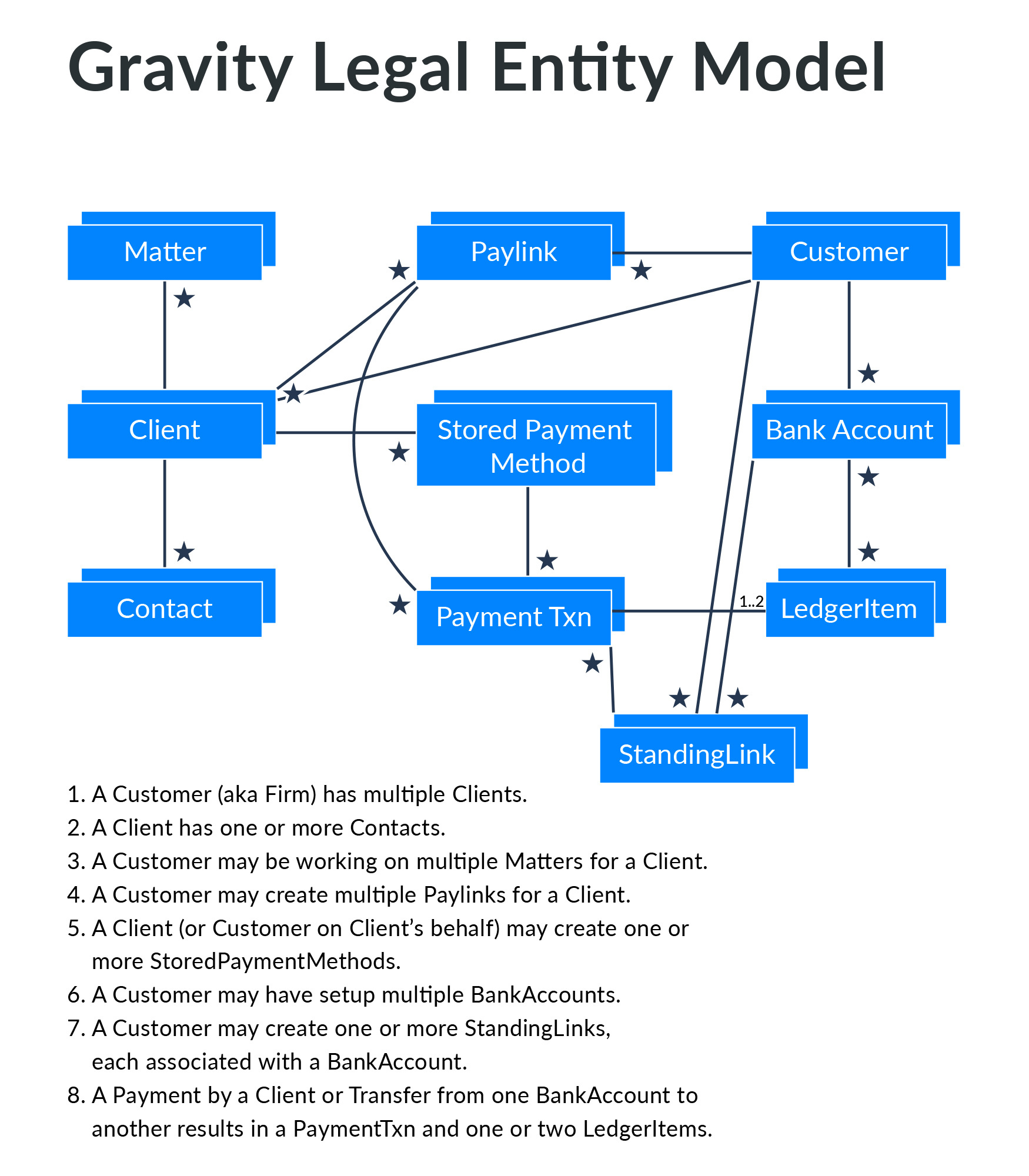
The diagram at right depicts the Gravity Legal entities and their relationships for a specific partner:
- A Partner has multiple
Customers (referred to asFirms in the UI and user facing documentation). ACustomerrepresents the partner’s customer and is like a container for entities belonging to the customer such asClients,Matters,Paylinks,StandingLinks,StoredpaymentMethods etc. - A
Customermay have multipleClients. Customers request their clients for payment by creating a newPaylinkor updating an existing one. These Paylinks may be sent directly to the client by a user or user’s system via email, text or embedded in Invoices. Clients pay by visiting thePaylinks URL. The paylink pages, which accept client’s payment details, are hosted and served securely by Gravity Legal. - A
Clientmay have one or moreContacts. One of the contacts is the primary contact and must be present. An individual client will be same as the primary contact whereas an organizational client may have additional contacts. - An attorney or firm (a
Customerwithin the system) may represent aClienton multipleMatters. Paylinks are created for a Client and may refer to a specificMatter.StandingLinks are associated with a specific deposit account of the customer and multiple clients may make payments through a single standing link. These payments are later associated with specific clients and, optionally, matters.- A
Customermaintains multipleBankAccounts to accept client payments. ABankAccountmay be designated asoperatingortrust. - Details of payment by a Client against a
Paylinkare captured inPaymentTxns. There can be multiplePaymentTxns associated with a singlePaylink. - Movement of money into trust and operating accounts, either via client payments or the
trustToOperatingTransferoperation, are recorded asLedgerItems.
Specifics of entity properties, relationships and operations can be found in the entity specific sections.
Partner Integrations
A partner integration using the Gravity Legal API consists of a module hosted by the partner system. This module is responsible for:
- Onboarding existing or new
Customers to Gravity Legal. - Creating
Paylinks orStandingLinkss and tracking payments. These links can then be included in client invoice and/or client facing web pages. It is also possible to iframe these.
Onboarding Customers
Find below the steps involved in onboarding a customer. All or some of these can be accomplished programmatically via the API or through the UI.
- Partner system or representative creates a new
Customerentity (aka, Firm) in Gravity Legal. - Partner system or representative invites the customer representative to Signup for Gravity Legal by email address.
- Customer representative fills-in the forms for Credit/Debit and/or Bank Transfer processing at Gravity Legal Web UI.
- Gravity Legal support completes the processing and updates the
Customerstatus and information about its operating and trust Bank Accounts in the Gravity Legal system. - Partner system or representative updates its own system to indicate readiness to use Gravity Legal for accepting payments.
- Partner system creates customer’s existing and new
Clients andMatters in Gravity Legal using the API
Creating Payment Links and Tracking Payments
This happens much more often (compared to Customer onboarding) and must be automated via use of APIs.
- Partner system creates a
Paylink. - Partner system sends the
Paylinkurl to the customer’s client. This could happen via Partner’s website, email to the client or some other mechanism. - Customer’s client visits the Paylink url and makes the payment at Gravity Legal payment page. Partner system gets notified via a webhook call.
Trust to Operating Transfers
- Partner system invokes
trustToOperatingTransferAPI call.
Environments
A sandbox environment allows partners and customers to get familiar with the APIs to test their integrations before moving to the production environment.
- Sandbox Web UI URL: https://app.sandbox.gravity-legal.com
- Sandbox Base API URL: https://api.sandbox.gravity-legal.com
- Production Web UI URL: https://app.gravity-legal.com
- Production Base API URL: https://api.gravity-legal.com
These environments are completely segregated with their own user ids and API tokens.
Authentication and Authorization
Authentication and Authorization Headers
Authorization: Bearer <token>
X-PRAHARI-APPID: <appId>
X-PRAHARI-ORGID: <orgId>
Each request to a Gravity Legal endpoint must include HTTP headers Authorization, X-PRAHARI-APPID and X-PRAHARI-ORGID, as shown in the right:
<token>inAuthorizationheader encapsulates the caller’s identity. It is a JWT (JSON Web Token) signed by Gravity Legal and issued to a partner or customer. The<token>issued to a partner has the privileges of a partner admin and allows access to all entities belonging to the partner via the API. Similarly, the<token>issued to a customer allows access to all entities belonging to the customer.<appId>inX-PRAHARI-APPIDis a string identifying the partner.<orgId>inX-PRAHARI-ORGIDheader value is a string identifying a specific customer and defines the scope of the request. There is a special<orgId>value that represents all customers of the partner, allowing operations that span all its customers, such as listing allPaylinks with outstanding amount greater than a particular value.
<token>, <appId>, <orgId> and base part of the endpoint URLs can be downloaded in an .env.<id> file by a partner or customer admin via the Web UI.
API Structure
Entity and Operation Specific API Endpoints
The Gravity Legal API is a RESTful API conforming to industry standard conventions. Specifically:
-
GET <envUrl>/v1/entities/<Entity>/<entityId>[?select=<propList>]retrieves the the<Entity>instance identified by<entityId>. Without the optional<propList>, the response message includes only the direct properties. With<propList>, related entities and their properties can be retrieved as well. -
GET <envUrl>/v1/entities/<Entity>[?<params>]retrieves a collection of entity objects (ie; lists) specified via<params>. More on<params>and its effect on the response is covered in a subsequent section. -
POST <envUrl>/v1/entities/<Entity>creates an entity instance with the property values specified in the JSON body of the request. The response message is a JSON representation of the created object, including the uniqueidgenerated by the Gravity Legal backend. -
PATCH <envUrl>/v1/entities/<Entity>/<entityId>updates the entity object uniquely identified by<entityId>with the new value of properties included in the request JSON body. The properties not included in the request body are left unchanged. -
POST <envUrl>/v1/entities/<Entity>/<entityId>/<instanceOp>performs the operation identified by<instanceOp>on the entity instance identified by<entityId>. The json payload is supplied as the input to the operation. -
POST <envUrl>/v1/entities/<Entity>/<entityOp>performs the operation identified by<entityOp>on the entity. Note that this operation is not associated with a specific instance. The json payload is supplied as the input to the operation. -
POST <envUrl>/v1/operations/<op>performs a standalone operation identified by<op>. This operation also may have a json payload.
The structure of request and response messages for instance, entity and standalone operations are operation specific and are documented in relevant sections.
The status code returned on successful execution is 2xx. On failure, the status code could be 4xx to indicate problems with the request message and 5xx to indicate a server side problem.
Request and Response Messages
Success response
{
  result: <json-object>
}
Failure response
{
  error: {
    code: <string>,
    message: <string>
  }
}
-
GETandDELETErequests don’t carry any request body. All others include JSON text as request body with HTTP headerContent-Typeset toapplication/json. -
Success response messages originating from the server are JSON text with response HTTP header
Content-Typeset toapplication/json. As shown in the right hand side, there is a single top-level elementresult. Its value depends upon the operation. -
Failure response messages accompany non-2xx status code and may or may not include a JSON text. Failure reported by the server usually will have the JSON text. Keep in mind that some errors might originate in the network or serving infrastructure such as the API g/w. These errors don’t follow the above rule.
Property Types
Entity properties are typed values. Supported types are shown below:
| datatype | description |
|---|---|
| string | sequence of characters |
| uuid | stored as 16-byte value and represented as 8-4-4-4-12 for a total of 36 characters |
| enum | one value of type string from a list of string values |
| number | a numeric value |
| int | an integer |
| boolean | takes one of the two values: true and false |
| date | point in time, represented as ISO 8601 string |
| json | JSON object |
| <Entity> | a one-to-one or many-to-one relationship to <Entity> |
| <Entity>[] | a one-to-many or many-to-many relationship to <Entity> |
Common Properties
These properties are common to all the entities:
| property | datatype | description |
|---|---|---|
| id | uuid | system generated unique id |
| externalId | string | caller assigned id. can be used for lookups |
| createdOn | date | entity instance creation timestamp |
| updatedOn | date | entity instance update timestamp |
Entity specific table of properties do not include these ones.
Pagination
LIST Request
GET <envUrl>/v1/entities/<Entity>?pageNo=<page-no>&pageSize=<page-size>
Success response of a LIST operation
{
  result: {
    pageNo: <page-no>,
    pageSize: <page-size>,
    totalCount: <count>,
    records: [ <record1>, <record2>, ...]
  }
}
List operations may cause a large number of records to be returned. These records are paginated for easier handling by the API client and managing load on the server. The request itself may specify pageNo and pageSize parameter values, as shown to the right. The starting page no. is 1 (and not, 0). The default value for pageNo and pageSize are 1 and 25, respectively.
Ordering
LIST Request with Ordering
GET <envUrl>/v1/entities/<Entity>?orderBy=<prop>&orderDir=desc
The records in the response message of a list operation may be ordered by any of the properties that supports ordering. Datatypes that support ordering are: number, int, date, and string.
The property to be used for ordering is specified via orderBy parameter and the order direction is specified via orderDir parameter. Possible values for orderDir are asc and desc, with asc being the default.
Filtering
LIST Request with Matching Property
GET <envUrl>/v1/entities/<Entity>?<prop1>=<value1>
LIST Request with Date Range
GET <envUrl>/v1/entities/<Entity>?createdOn:range=['2014-03-12T13:37:27', '2018-03-12T13:37:27']
A number of operators are supported on properties to return a subset of records satisfying the condition on list operation. These are specified as <param>=<value> in the query string.
| Param | Value | Description |
|---|---|---|
| <prop> | <value> | returns entity records with property <prop> matching the specified <value> |
| <prop>:not | <value> | returns entity records with property <prop> NOT matching the specified <value> |
| <prop>:in | (a, b, …) | returns entity records with property <prop> in the specified set. |
| <prop>:not_in | (a, b, …) | returns entity records with property <prop> NOT in the specified set. |
| <prop>:range | [a, b], ]a, b], [a, b[, ]a, b[ | returns entity records with property <prop> in the specified range. Range [a, b] translates into condition a <= <prop> <= b, range ]a, b] translates into condition a < <prop> <= b and so on. |
For operators :in and :not_in, the values within parentheses MUST NOT be inlcuded in single or double quotes. If a string value includes comma then it must be repeated. For example, to get Matters with names ‘The case of John, Harry and Debbie’ and ‘The case of Natalya’, the request is shown in the right hand side:
LIST Request with :in operator and names with commas
GET <envUrl>/v1/entities/Matter?name:in=(The case of John,, Harry and Debbie, The case of Natalya)
Presence of more than one condition in a request mean ALL the conditions must be satisfied by returned records.
Customer
Requests to get all or some Customers
GET <envUrl>/entities/Customer
GET <envUrl>/entities/Customer?externalId=cus_11111111
GET <envUrl>/entities/Customer?ccActivated=false
Sample response message
{
  "result": {
    "records": [
      {
        "appId": "tpartnr",
        "id": "138eb3cc-7d64-4456-a79f-aacfce65c5ba",
        "createdOn": "2019-12-03T19:50:17.175Z",
        "updatedOn": "2019-12-03T20:26:38.000Z",
        "deleted": false,
        "externalId": "11111111",
        "achActivated": true,
        "achEnabled": false,
        "achProcessor": "vcmock",
        "appData": null,
        "ccActivated": true,
        "ccEnabled": false,
        "ccProcessor": "epmock",
        "checkEnabled": false,
        "defaultDepositAccounts": {
          "operating": "76985bd6-df51-4bc0-adc2-473d02da1e29",
          "trust": "140a8e7b-611e-4194-a73a-1341c0553fc4"
        },
        "name": "Test Firm #2",
        "orgId": "b172cf23-4565-46a5-802b-0b8040677c6c",
        ...
      }
    ]
    "totalCount": 1,
    "pageNo": 1,
    "pageSize": 25
  }
}
A Customer object represents a firm. A partner software may create Customer entities in Gravity Legal as it onboards new customers in its own system.
| property | datatype | description |
|---|---|---|
| name | string | firm display name |
| ccActivated | boolean | readonly. flag indicating Credit/Debit payment setup. updated by the system on successful CC application processing |
| ccEnabled | boolean | flag indicating Credit/Debit payment option for payers. Can be used to temporarily disable |
| achActivated | boolean | readonly. flag indicating ACH payment setup. updated by the system on successful ACH application processing |
| achEnabled | boolean | flag indicating bank transfer payment option for payers. Can be used to temporarily disable |
| checkMailingAddress | Address | address to mail paper cheques |
| checkEnabled | boolean | flag indicating paper cheque acceptance. Requires checkMailingAddress to be set |
| clients | Client[] | readonly. customer’s clients. |
| ledger | LedgerItem[] | readonly. All book-keeping entries associated with the customer |
| paylinks | Paylink[] | readonly. Payment Links created by the customer |
Get A Customer By Id
Requests to a specific Customer object
GET <envUrl>/entities/Customer/138eb3cc-7d64-4456-a79f-aacfce65c5ba
Sample success response
{
  "result":
    {
      "id": "138eb3cc-7d64-4456-a79f-aacfce65c5ba",
      "name":"The Old Firm",
      ...
    }
}
Sample success response with missing object
{
  "result": null
}
The id needs to be part of the URL and the returned message has the JSON object as value of the top-level field result.
If the object corresponding to the id doesn’t exist then the response message has status code of 200 but the top-level field result is set to null.
Update A Customer
Requests to a specific Customer object
PATCH <envUrl>/entities/Customer/138eb3cc-7d64-4456-a79f-aacfce65c5ba
{
  "name": "The New Firm"
}
Sample response
{
  "result":
    {
      "id": "138eb3cc-7d64-4456-a79f-aacfce65c5ba",
      "name":"The New Firm",
      ...
    }
}
The sample request and response message on the right illustrate change of name. Property name is one of the few that can be updated. Most others are read-only. Note: the backend implementation is not fully hardened to reject such updates yet.
Instance Operation inviteUser
Sample Request
POST <envUrl>/entities/Customer/bb8c380d-19b9-4e11-b893-482fd3206eda/inviteUser
{
  "firstName": "Jane",
  "lastName": "Doe",
  "email": "jane.doe@example.com",
  "role": "admin"
}
Sample Response
{
  "result": {
    "id": "c142b48c-76f1-4f8e-a535-e323439be791",
    "firstName": "Jane",
    "lastName": "Doe",
    "status": "OUTSTANDING",
    "email": "jane.doe@example.com",
    "role": "admin"
  }
}
This instance operation can be used to invite a new user by email address to join as Firm admin programmatically.
This request causes a Welcome email message to be delivered to the email Inbox.
Client
Client Creation Request
Client Creation Request (Alternative Form)
Client Retrieval Request
Client List Request (for a specified customer)
A Client entity represents a paying client of a Customer, which can be a Person or an Organization.
A partner software may create Client entities associated with a Customer in Gravity Legal. Or a Customer software
may create its own Client entities.
A Client entity may be associated with one or more Contact entities. One of these must be desiganted as the
primaryContact. To create a Client, send the Client payload with the indvidual properties clientName, firstName, lastName,
phone, email, and address and the backend will create a Contact entity and make it the primaryContact. To create
a Client with multiple contacts, first create Address entities, then Contact entities with address property set to the corresponding
id returned and finally the Client entity. The resquest and response snippets at the right side show examples of both.
As you can see in the following table, most properties are optional.
| property | datatype | description |
|---|---|---|
| clientName | string | Client’s name. Optional. Created by concatenating firstName and lastName if not present in create request. |
| firstName | string | First name of the primary contact. Mandatory. |
| lastName | string | Last name of the primary contact. Optional. |
| fullName | string | Readonly. Concatenation of first and last name. |
| phone | string | Primary contact’s phone number for display purposes. Optional. |
| string | Primary contact’s email for display purposes. Optional. | |
| primaryContact | Contact | Primary contact. Optional. |
| contacts | Contact[] | list of contacts. Optional. |
| outstanding | integer | readonly. outstanding amount against the client, in cents |
| totalRevenue | integer | readonly. total amount paid by the client, in cents |
| customer | Customer | The firm owning the client. A partner request needs to specify this. For a customer request, this is taken from HTTP headers. |
Clients representing either Person or Organization must have a primary contact. The clientName property may be omitted for a Person client.
Contact
| property | datatype | description |
|---|---|---|
| firstName | string | Contact’s first name. Mandatory. |
| lastName | string | Contact’s last name. Optional. |
| phone | string | Contact’s phone number for display purposes. Optional. |
| string | Contact’s email for display purposes. Optional. | |
| client | Client | Owning Client entity. Mandatory. |
Details of CRUD and List operation omitted for brevity.
Matter
A Matter object represents a legal case being represented by the firm on behalf of its client. A partner software may create Matter entities associated with its Client in Gravity Legal.
| property | datatype | description |
|---|---|---|
| name | string | description of the matter |
| latestActivity | date | readonly. timestamp of the latest activity related to the client |
| outstanding | integer | readonly. outstanding amount against the client related to this matter, in cents |
| paid | integer | readonly. total amount paid by the client related to this matter, in cents |
| client | Client | the client associated with the matter |
| paylinks | Paylink[] | readonly. Payment Links created for the client related to this matter |
Details of CRUD and List operation omitted for brevity.
BankAccount
A BankAccount object represents a bank account owned by the firm. It gets created within the Gravity Legal after it is approved to accept client payments. The partner system may retrieve it to match with its internal records.
| property | datatype | description |
|---|---|---|
| accountHolderName | string | Bank account holder’s name |
| accountNumber | string | Account number. All but the last 4 digits are masked |
| routingNumber | string | Account’s routing number. All but the last 4 digits are masked |
| accountCategory | string | either ‘operating’ or ‘trust’ |
| accountType | string | either ‘checking’ or ‘savings’ |
| customer | Customer | readonly. Customer owning the bank account |
| ledger | LedgerItem[] | readonly. items representing money movement in/from the account |
A BankAccount object cannot be created, updated or deleted using API calls.
Details of Retrieve and List operations omitted for brevity.
Paylink
Paylink Creation Request
POST <envUrl>/entities/Paylink
{
    "customer": "e99eff21-64c8-43aa-97c7-5bc2530bcce5",
    "client": "2b2c3bea-e139-483e-bb36-4a3a00158dd4"
}
A Paylink object represents a Payment Link, a simplified instrument to bill clients for operating and/or trust amounts. A partner software may create Paylink entities, specifying Customer, Client and optionally, Matter by id and add outstanding operating and/or trust amounts with instance operation addToPaylink
| property | datatype | description |
|---|---|---|
| customer | Customer | mandatory. specify Customer’s id at creation |
| client | Client | mandatory. specify Client’s id at creation |
| matter | Matter | optional. specify Matter’s id at creation |
| outstanding | integer | readonly. Amount outstanding (in cents) |
| paid | integer | readonly. Amount paid so far (in cents) |
| url | string | readonly. URL to be sent to the client for making payment |
| ledger | LedgerItem[] | readonly. items representing money movement related to this Paylink |
| webhookDetails | JSON | readonly. result of the last webhook callback. helpful for debugging |
A Paylink may not be updated after creation, except via instance operation addToPaylink that adds outstanding operating and/or trust amount to the Payment Link.
Instance Operation addToPaylink
addToPaylink Request
POST <envUrl>/entities/Paylink/9fb8942b-6180-44a7-93be-a9af5e956209/addToPaylink
{
    "trust": { "amount": 100000 },
    "operating": { "amount": 20000 }
}
This instance operation adds amounts to be collected from the client to an existing Paylink object. This way a single Payment Link can be used to collect multiple payments.
trustToOperatingTransfer
Sample Request
POST <envUrl>/operations/trustToOperatingTransfer
{
    "customer": "e99eff21-64c8-43aa-97c7-5bc2530bcce5",
    "client": "2b2c3bea-e139-483e-bb36-4a3a00158dd4"
    "amount": 50000
}
Sample Response
{
  "result": {
    "success": true
  }
}
This operation allows programmatic transfer of money from trust bank account to operating bank account.
This sample operation request initiates a transfer of $500.00 from the trust account to the operating account associated with the customer. A successful result only means that the call to initiate the Bank Transfer has succeeded, not that the transaction has been committed or even settled.
Trust and operating Bank accounts are setup for the customer at the time of ACH onboarding. In case of more than one Bank Accounts in either category, one in each category must be designated as the default for this call to succeed. If a specific trust or operating account is associated with the client then that one takes priority.
Errors
The Gravity Legal API uses the following error codes:
| Error Code | Meaning |
|---|---|
| 400 | Bad Request – there is a problem with the request |
| 401 | Unauthorized – your API key is missing or wrong or you don’t have access to the operation |
| 403 | Forbidden – the endpoint is not exposed |
| 404 | Not Found – the specified resource or operation could not be found |
| 405 | Method Not Allowed – request using an invalid method |
| 429 | Too Many Requests – You’re making too many requests! Slow down! |
| 500 | Internal Server Error – We had a problem with our server. Try again later. |
| 503 | Service Unavailable – We’re temporarily offline for maintanance. Please try again later. |